
How Fraudsters Are Making Their Way into Your Group Chats and How You Can Stay Safe
Our parents and grandparents may have told us stories about how telegrams were once used to communicate. People had to visit a telegraph office, fill out a form, and even pay based on the number of words in the message. Instant communication, as we know it today, was once difficult to imagine.
Today, messaging apps and digital payment platforms like UPIPe have made communication and payments much faster and more convenient. Whether you are chatting with friends, discussing business, or managing shared expenses, instant messaging has become a regular part of everyday digital life.
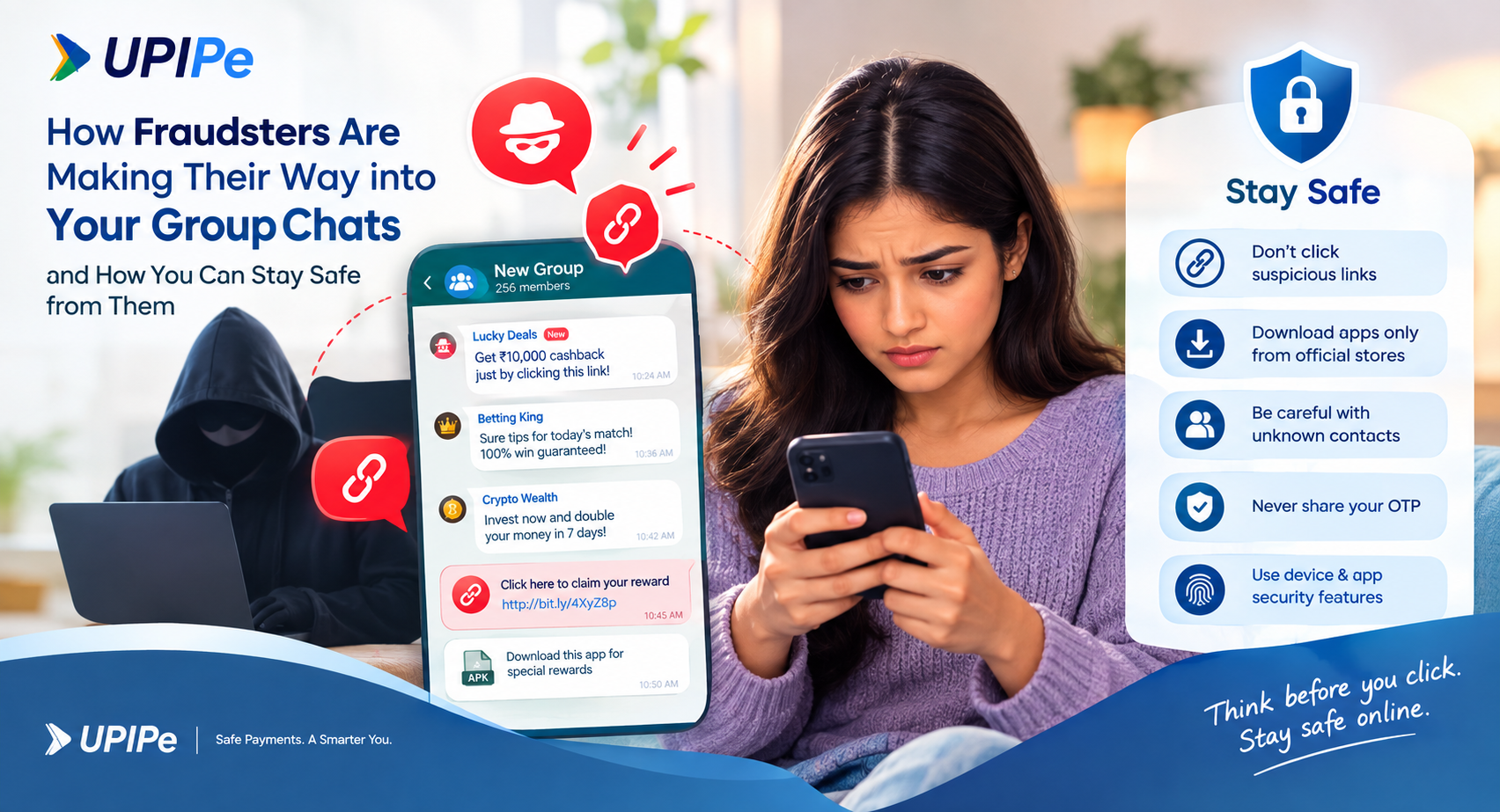
Unfortunately, fraudsters are also taking advantage of these features. Scammers may enter group chats, send deceptive messages, promote fake rewards, or share malicious links designed to steal sensitive information and money.
In this article, we’ll explain how group chat scams work, what warning signs to watch for, and what you can do to protect yourself while using messaging and digital payment platforms.
How Group Chat Scams Work
A typical scam involving chat or group features can happen in several stages:
1. You Receive an Unexpected Message or Group Invitation
You may receive a private message from an unknown person or suddenly find yourself added to a group chat by someone you don't recognize.
The group may appear legitimate at first, sometimes using attractive names, logos, promotional messages, or claims about special offers.
2. Scammers Promote Attractive Offers
Once you are inside the group, fraudsters may start sharing messages about:
Get-rich-quick opportunities
Betting or gaming tips
Fake cashback offers
Exclusive rewards
Investment opportunities
Discount coupons
Free gifts or promotional schemes
The goal is usually to create excitement or urgency so that you act without checking whether the offer is genuine.
3. A Suspicious Link Is Shared
The scammer may then send a link claiming that you need to click it to claim a reward, receive cashback, download an application, or participate in a special offer.
These links can lead to fake websites or malicious applications.
4. A Fake or Malicious APK Gets Installed
In some cases, scammers encourage users to download an APK file outside the official app stores.
Once installed, a malicious application may request unnecessary permissions and potentially attempt to access sensitive information on your device.
Depending on the malware, criminals may try to:
Intercept SMS messages or OTPs
Access files and photos
Collect personal information
Monitor device activity
Steal sensitive documents
Misuse banking or payment-related information
5. Stolen Information Can Lead to Financial Fraud
If scammers gain access to sensitive information, they may attempt to use it for unauthorized transactions, identity theft, or other fraudulent activities.
This is why downloading unknown applications or clicking suspicious links can put both your personal information and finances at risk.
How to Protect Yourself from Group Chat Scams
Digital payment platforms and messaging services can be used safely when you follow basic security practices. Many scams succeed because people react quickly when they see an exciting reward or feel pressured by an urgent message.
Before clicking a link, downloading an application, or sharing information, take a moment to verify what you are being asked to do.
Here are some practical ways to stay safer online:
Don't Download Apps from Chat Links
Never install an application simply because someone shared an APK or download link in a chat or group.
Download applications only through trusted and official sources such as Google Play Store, Apple App Store, or other recognized official app stores.
Be Careful with Unknown Contacts
If a person you don't know adds you to a group or sends you an unexpected message, don't immediately trust the information they provide.
Be particularly cautious when the conversation involves money, rewards, investments, betting, or requests to download an application.
Review App Permissions
Regularly check the permissions granted to applications on your smartphone.
Pay particular attention to apps that request access to:
SMS messages
Files and photos
Contacts
Phone calls
Accessibility services
If an unfamiliar application has unnecessary permissions, consider removing the permissions or uninstalling the application.
Never Share Your OTP
Your OTP is private. Never share it with another person through a chat, phone call, SMS, or social media conversation.
A legitimate payment service or bank representative should not ask you to disclose your OTP or other confidential authentication information.
Use Device and Payment App Security
Protect your smartphone and payment applications with available security features such as a screen lock, fingerprint authentication, or Face ID.
These additional security measures can help prevent unauthorized access if someone gets hold of your phone.
What to Do If You Have Installed a Fake App
If you accidentally installed an application from an unknown link or suspect that an app may be malicious, act quickly.
1. Uninstall the Suspicious Application
Remove the application from your device as soon as possible. If the application prevents you from uninstalling it, review its device administrator or accessibility permissions and disable them if appropriate.
2. Disconnect Your Device from the Internet
Temporarily turn off mobile data and Wi-Fi if you suspect that the application is actively communicating with scammers.
3. Secure Your Important Accounts
Change passwords for important accounts, particularly your banking, email, and payment-related accounts.
If you believe your payment credentials or financial information may have been compromised, contact your bank or payment service provider immediately.
4. Monitor Your Financial Accounts
Check your bank and payment accounts for transactions you don't recognize.
If you notice an unauthorized transaction, report it immediately to your bank or relevant payment service provider and follow their instructions.
How to Report a Digital Payment Scam
If you believe you have been targeted by a scam, don't ignore it. Reporting fraud quickly can help limit potential losses and may assist authorities in investigating the incident.
Reporting Through UPIPe
If you encounter suspicious activity while using UPIPe, use the available Help or Support section within the platform to raise a complaint or report the issue.
You should provide relevant details about the suspicious transaction, message, account, or activity when submitting your complaint.
Never share your OTP, PIN, password, or other confidential authentication information while reporting an issue.
Report Cyber Fraud in India
If you have experienced financial cyber fraud, you can report it through the official National Cyber Crime Reporting Portal or contact the cybercrime helpline at 1930.
For suspicious calls, messages, or other communications, you can also use the Chakshu facility available through the Sanchar Saathi portal.
Stay Alert, Stay Safe
Group chats and instant messaging make digital communication incredibly convenient, but convenience should never replace caution.
Scammers often rely on curiosity, excitement, fear, and urgency to make people act quickly. A message promising instant cashback, a high-value reward, easy money, or an exclusive opportunity may look convincing, but that doesn't mean it is genuine.
The safest approach is simple: don't click suspicious links, don't install apps from unknown sources, don't share OTPs or confidential information, and always verify before making a payment or taking action.
Whether you're using UPIPe for everyday digital payments or communicating through online platforms, a few seconds of caution can help protect your money and personal information.
Think before you click. Verify before you pay. Stay safe online.